Application protection (AppSec)
Application protection checks every request sent to a published service before it reaches the
application, and stops the requests that try to exploit known vulnerabilities: attempts to read .env or
.git files, the requests that exploit published flaws of common software (CMS, frameworks, network
appliances, development tools left online) and similar attacks. It is done by
CrowdSec AppSec, running on the Neti server, with rules that CrowdSec keeps
up to date every night. It is a Neti Pro feature.
Where: the component is installed in Server → Components, the protection is
turned on per service in Routing, and its counters and events are in Security.
Installing the component needs the permission Manage the system (manage.system); choosing the
mode of a service needs manage.routing.
What it stops, and what it does not
The rules are those of two CrowdSec collections:
- virtual patching (
crowdsecurity/appsec-virtual-patching): one rule for each known vulnerability that is exploited on the Internet, written to recognise the exploit request. It protects an application that has not been updated yet, until you update it; - generic rules (
crowdsecurity/appsec-generic-rules): requests for files that must never be served (.env,.git, backup and configuration files) and other common probes.
These rules are precise and almost never block a legitimate request. They are not a full web application firewall: generic SQL injection or cross-site scripting aimed at flaws of your own application are not their target. Keep applications up to date; application protection buys time and removes the noise of automated attacks.
Requirements
- A Neti Pro licence, active on the node (License). On a Free node the component is not listed and the menu of the services shows the Pro note.
- CrowdSec installed (Server → Components → CrowdSec). AppSec is part of CrowdSec: no other software is downloaded from outside Debian and CrowdSec.
- CPU in proportion to the traffic (see Performance).
How to install the component
- Open Server and scroll to Components.
- On the row AppSec (application protection, Neti Pro) press Install and confirm. If CrowdSec is missing, install it first from the row above.
- The state becomes installing…; the page refreshes by itself every 5 seconds until the job ends, usually in less than a minute. The button log shows what is being done.
- At the end the row shows installed, the version of the nginx Lua module, the state listening, the number of rules (around 220) and when the rules were last updated.
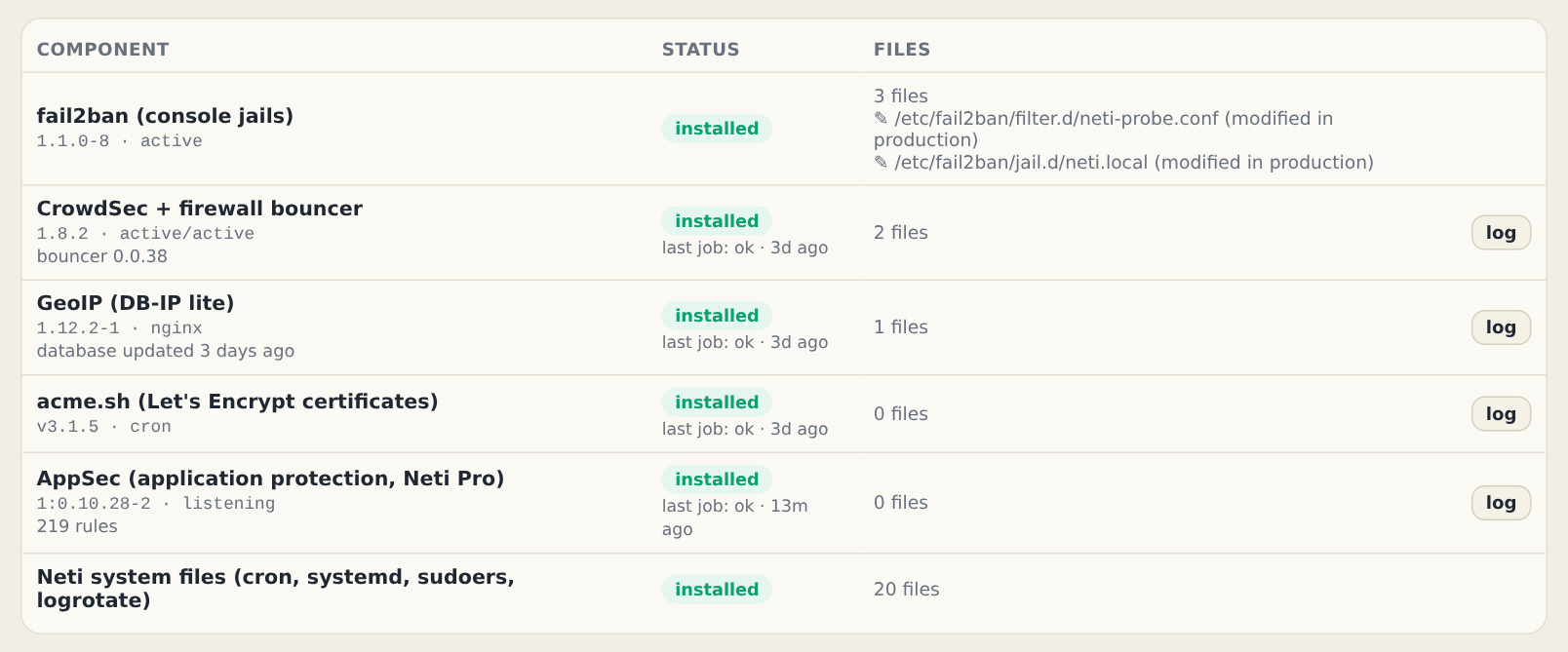
The installation:
- installs the Lua module of nginx from Debian (
libnginx-mod-http-luaand its libraries); - updates the index of the CrowdSec hub and installs the two rule collections;
- registers a key used only by Neti's connector;
- starts AppSec inside CrowdSec on the local address only (
127.0.0.1, ports 7422 and 7423), with one worker per core of the server; - adds Neti's connector to nginx, only after
nginx -taccepts the new configuration (if not, the previous configuration is put back and the job ends with an error).
The official nginx bouncer of CrowdSec is not installed: it would bring a C compiler and a package manager onto the gateway. Neti uses its own small connector, described below. Running Install again later (Repair) adds only what is missing.
Installing the component protects nothing by itself: no service is checked until you choose a mode for it.
How to turn it on for a service
- Open Routing and expand the service.
- Under the destination, in Application protection (AppSec), choose Detect (counts, does not block) and press Save. The header of the card shows AppSec · detect.
- Use the service normally for a few days and look at Security → Application protection: the requests that would have been blocked are listed there.
- If nothing legitimate appears in the list, switch to Block attacks and save. The header shows AppSec · block.
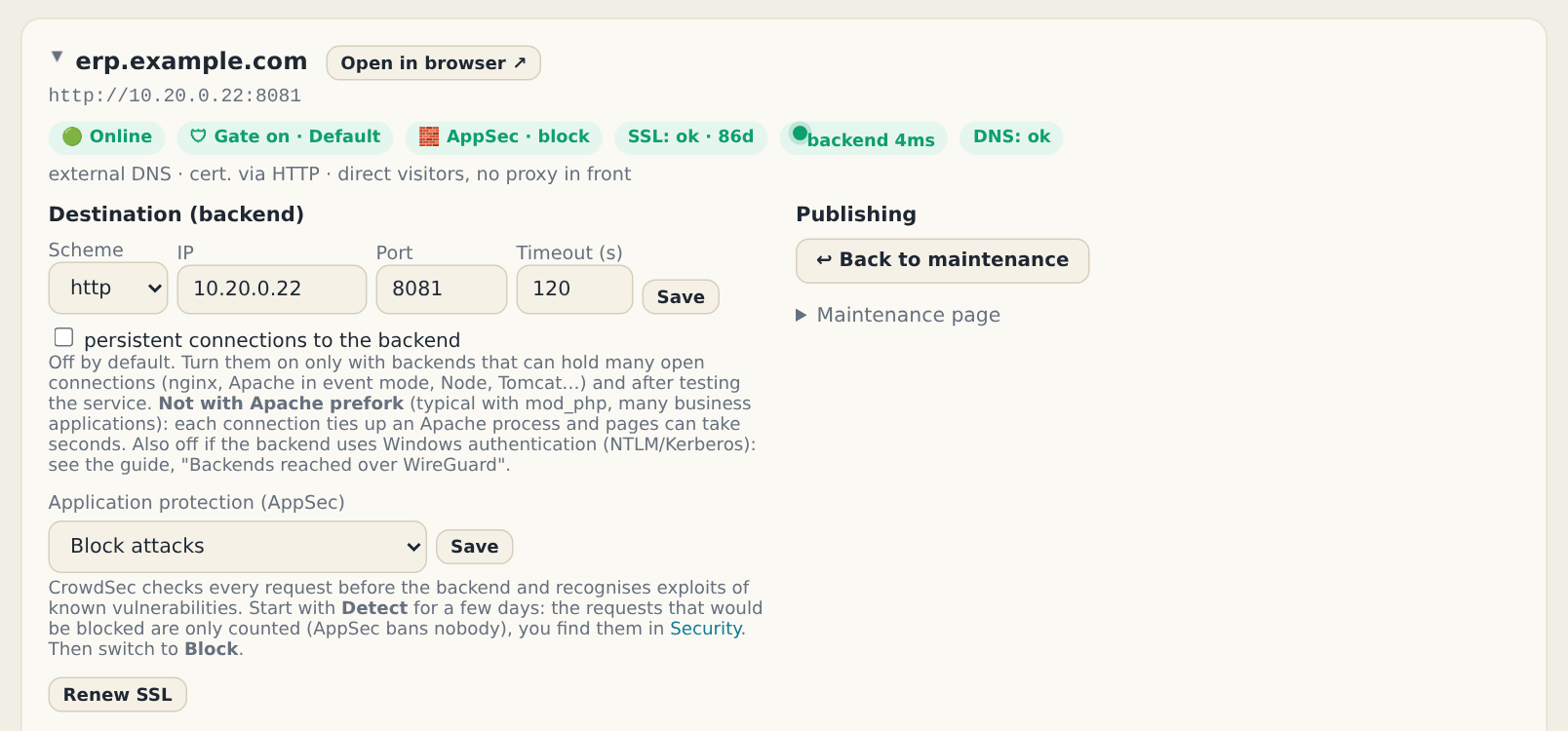
The change takes effect at once, without interrupting the service. All the options of the menu are described in Routing → Application protection.
How it works
The path of a request
A request to a protected service meets, in this order:
- the firewall: addresses banned by CrowdSec never reach nginx;
- the filters of the service (countries, request limits) and the gate: a visitor sent to the login page is not checked by AppSec, so the check costs nothing on the traffic that the gate already stops;
- application protection: Neti's connector sends the request (method, address, headers and body) to CrowdSec AppSec on the local address and waits for the verdict;
- the backend, only if the verdict allows it.
After login every request is checked as well, also those of suppliers and colleagues: an exploit does not become safe because it comes from a known user.
Detect and Block
AppSec listens on two local ports, one for each mode:
- Block (port 7422)
- A request that matches a rule gets 403 and never reaches the backend. CrowdSec records an alert with the name of the rule; when the same address triggers two different rules within a minute, CrowdSec bans it at the firewall for the usual duration of its bans. The ban appears in CrowdSec · local decisions, where it can be removed, and it counts in the filtering score like every CrowdSec decision.
- Detect (port 7423)
- The same rules are applied, but the matching requests pass. They are only counted and listed in Security: AppSec raises no alert and bans nobody, so trying the protection on a service in production is safe.
Application protection adds to what CrowdSec already does, it does not replace it. The CrowdSec scenarios that
read the nginx logs (installed with CrowdSec, before AppSec) keep working in every mode, also Off and Detect: some
of them recognise the same exploits from the log line, for example crowdsecurity/CVE-2017-9841, and
can ban an address after the request has been answered. The difference is that in Block mode the request is stopped
before it reaches the application.
Trusted networks
From the trusted networks of the service (the global ones and those of its filtering profile) an attack is still blocked in Block mode, but it is checked through the port that raises no alert: an address of the office is never banned at the firewall because of a false positive. In the events these requests are marked blocked · trusted network.
What is checked and what is skipped
- Static files (images, styles, scripts, fonts and similar, recognised by the extension) are not checked.
- Bodies of requests are checked up to 1 MB, also when sent in pieces (chunked) or over HTTP/2.
- A body larger than 1 MB is refused with 413 in Block mode, so an attack cannot be hidden behind a large padding; in Detect mode it passes and is counted.
- File uploads larger than 1 MB (
multipart/form-data) pass: the address, the headers and the URL are checked, not the content of the files. - Headers named
X-Crowdsec-Appsec-*sent by a client are removed: nobody can pretend to be the connector or forge the address seen by AppSec.
If AppSec does not answer
The connector waits at most 20 ms to connect, 50 ms to send and 100 ms for the verdict. If CrowdSec is stopped, restarting or overloaded, the request passes unchecked and the service keeps working: application protection never takes a service down. These requests are counted in Security as passed unchecked. Zero is the normal value; a number that keeps growing means the server is short of CPU.
The connector
Neti's connector is a small Lua module that runs inside nginx (/opt/neti/lua/neti_appsec.lua). It
keeps a few connections to AppSec open and reuses them, so a check costs a fraction of a millisecond of network
time. Its counters and the last 200 flagged requests are kept in the memory of nginx and are reset when nginx
restarts.
Performance
Measured on an 8-core test server, with the default rules:
| Without AppSec | With AppSec | |
|---|---|---|
| Time of a single request (median) | 0.4 ms | 0.9 ms |
| Slowest 1% of single requests | 4.4 ms | 4.2 ms |
| Simple pages, maximum throughput | about 15,000 per second | about 6,000 per second |
| Requests lost or passed unchecked under full load | — | 0 |
In practice: about half a millisecond more per request at normal traffic, which nobody notices, and about 1 ms of CPU per checked request (roughly 800 requests per second per core). For a company gateway the limit is far above the real traffic; on a small server with very busy public sites, turn the protection on for the services that need it most.
How to see what it does
Security → Application protection shows:
- the state (ACTIVE, or not active with the reason) and the services that use it, with their mode;
- requests checked and the average time of a check, blocked, detected and passed unchecked, and what was skipped, since nginx last started;
- the latest flagged requests: when, result, address (with the 🔎 button of the IP simulator), service and request.
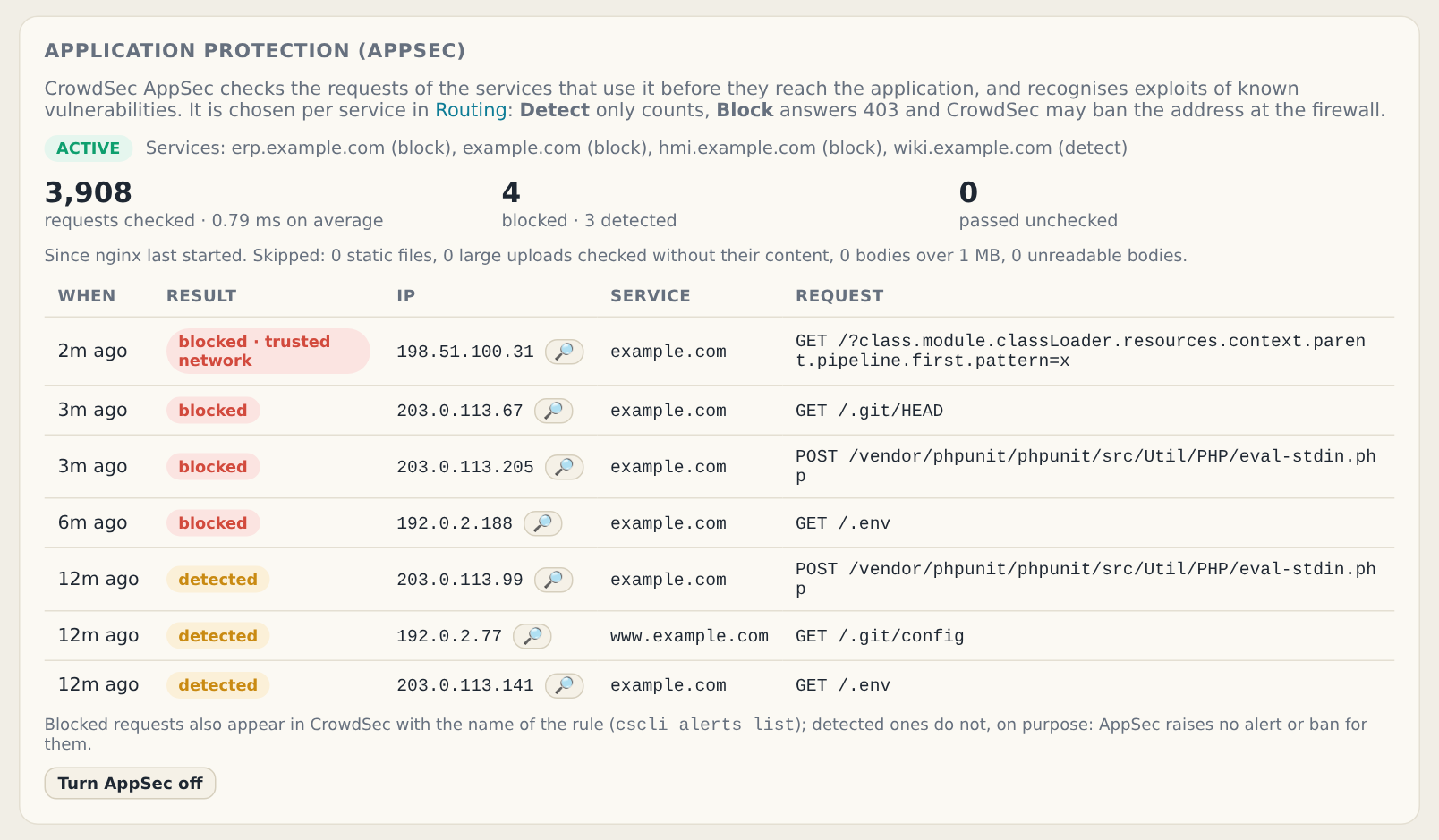
Every field is described in Security → Application protection. From the terminal, the blocked requests are also in CrowdSec with the name of the rule:
cscli alerts list -s crowdsecurity/appsec-vpatch
cscli alerts list --since 24h
cscli decisions list
How to turn it off
- For one service: in Routing choose Off and save.
- For all services at once, for example if an application stops working and you need time to understand why: Security → Application protection → Turn AppSec off. The connector is removed from nginx and AppSec stops; the settings of the services stay, and their cards show AppSec · not active in red.
- To turn it back on: Server → Components → AppSec → Repair. The services are protected again immediately, with the modes they had.
Troubleshooting
- A legitimate request is blocked (false positive)
- Find it in the events of Security: the request shows which address and which URL. Put the service back to
Detect so that it works while you look into it;
cscli alerts liston the server gives the name of the rule. If the users are in the office, add its network to the trusted networks: they will not be banned. Write to support with the name of the rule if it must be excluded. - The card shows "AppSec · not active" in red
- The service is set but its requests are not checked. The box in Security says why: the component is not installed or was turned off (Repair it in Server → Components), CrowdSec AppSec does not answer (check that CrowdSec is running), or the Neti Pro licence is not active on the node (License).
- "Passed unchecked" keeps growing
- AppSec is not answering within 100 ms: the server is short of CPU, or CrowdSec was restarting. Look at the load on the Dashboard; if it is constantly high, protect fewer services or move to a server with more cores.
- The installation ends with an error
- Open the log of the component. The common causes: CrowdSec missing, no access to the Debian mirror or to the CrowdSec hub, or an nginx configuration modified by hand that nginx does not accept (in that case the previous configuration is left in place).
- "last rule update failed" or "rules not updated for more than 3 days"
- The nightly update of CrowdSec could not download the rules.
journalctl -u crowdsec-hubupdategives the reason, usually the server cannot reach the CrowdSec site. To retry at once:systemctl start crowdsec-hubupdate. Protection keeps working with the rules already installed. - "nightly rule update not active"
- The timer of CrowdSec was disabled:
systemctl enable --now crowdsec-hubupdate.timer. - Large uploads fail with 413
- A body larger than 1 MB that is not a file upload is refused in Block mode. If an application sends large JSON or XML documents on purpose, keep that service in Detect.
Good to know
- The rules are updated by CrowdSec every night, together with the rest of its hub (timer
crowdsec-hubupdate: it downloads the new index, upgrades the installed collections, new virtual patches included, and reloads CrowdSec only if something changed); nothing has to be done in Neti. The AppSec row in Server → Components shows rules updated … and warns when the nightly update is not active, when its last run failed, or when the rules have not been updated for more than 3 days. The engine itself is updated with the packages of the server, the connector with Neti. - With the default settings of CrowdSec, which Neti does not change, the community receives only the address and the name of the scenario of the blocked attacks, not the content of the requests.
- The licences of the components are listed in Third-party components: CrowdSec AppSec rules (MIT), Coraza (Apache 2.0), lua-nginx-module (BSD).
- If the Pro licence expires, the services keep their setting but are no longer checked, and the console says so in Routing and in Security.