Server
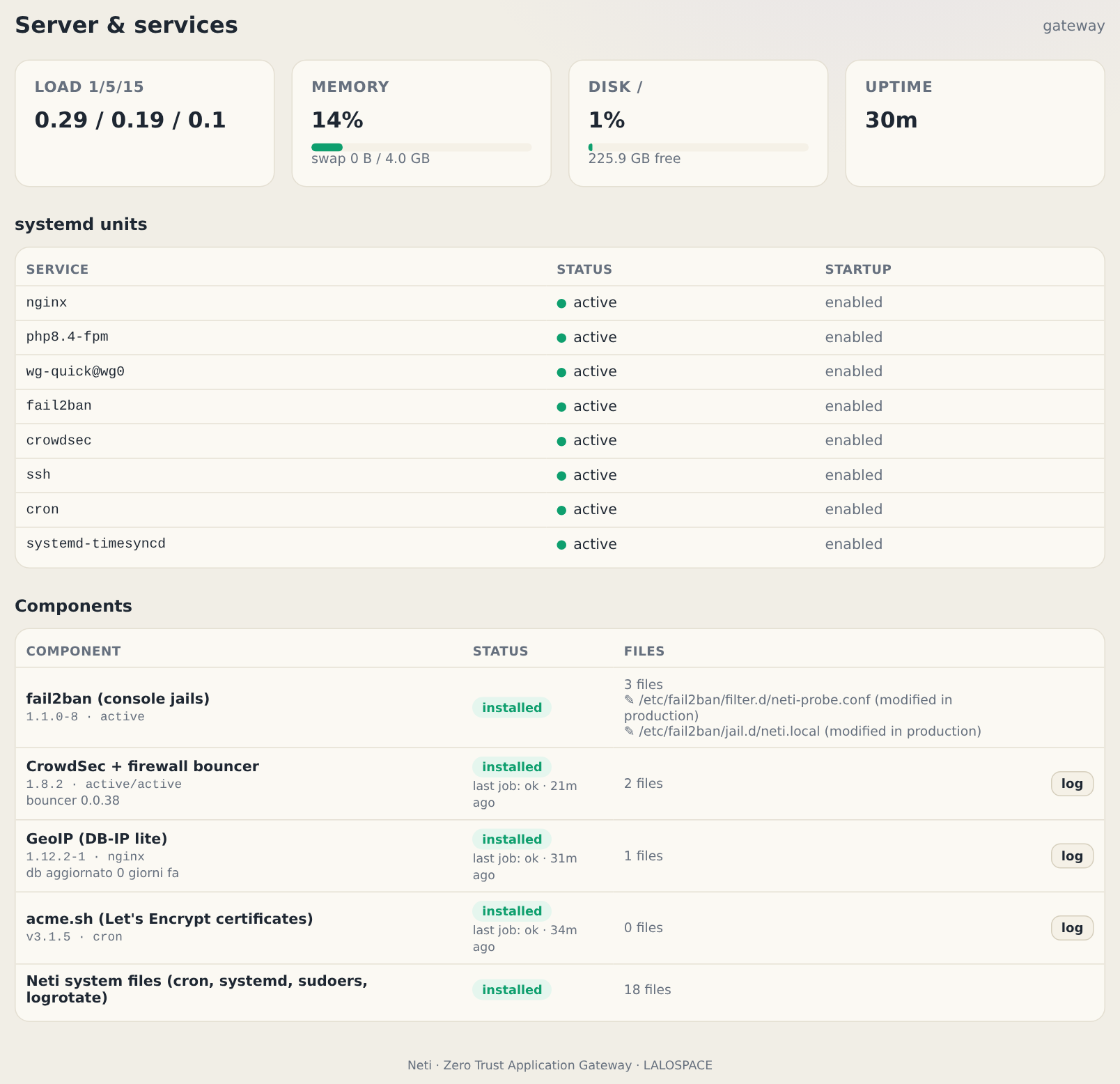
The Server section shows the health of the Neti machine itself: load, memory, disk, the system services Neti relies on and the optional components Neti can install by itself. When updates need a reboot, this is also where you reboot the server. The page is titled Server & services and shows the host name of the machine next to the title.
Where: menu Server. Permission to see it: Server and service status
(view.servers; Viewer, Operator and Admin roles). The buttons Reboot now,
Install and Repair need Install or repair system components
(manage.system, Admin by default). See Users.
Reboot required
This box appears at the top only when Debian reports that installed updates need a reboot to take effect (typically a new kernel or a core library). It disappears by itself after the reboot.
- The first line
- When the updates that are waiting were installed (date and time).
- Running kernel … installed …
- Shown when a newer kernel than the one in use is installed: until the reboot, the security fixes of the new kernel are not active.
- Required by
- The packages that asked for the reboot.
- Reboot now
- Asks for confirmation and reboots the server a few seconds later. For about a minute the published services and the console do not respond; then reload the page. Neti, the firewall and the protections start again by themselves, and the WireGuard tunnels reconnect. The reboot is recorded in Activity. Neti never reboots the server on its own. See Updates.
Tiles
- Load 1/5/15
- The load average of the system over the last 1, 5 and 15 minutes. As a rule of thumb, a load that stays above the number of CPUs of the machine means the server is under strain.
- Memory
- Percentage of RAM in use (total minus what the kernel reports as available), with a bar that turns yellow from 75% and red from 90%. Below: swap used and total.
- Disk /
- Percentage of the root file system in use, with the same bar, and the free space. Logs, backups and the database of Neti are on this disk: do not let it fill up.
- Uptime
- How long the server has been running since the last boot. Below it, the version of the kernel in use (after a kernel update it changes only with the reboot).
systemd units
The system services that make up the stack, read from systemd each time the page is loaded:
| Unit | What it is for |
|---|---|
nginx | the reverse proxy that serves the published services and the console |
php…-fpm | runs the console and the gate pages (the name contains the installed PHP version) |
wg-quick@wg0 | the WireGuard hub (see Network & Tunnels) |
fail2ban | bans addresses that repeat failed attempts |
crowdsec | optional: blocks addresses reported by the community |
ssh | SSH access to the server |
cron | runs the periodic jobs of Neti (probes, renewals, updates of the lists) |
systemd-timesyncd | keeps the clock exact (certificates and codes depend on it) |
- Service
- The name of the unit.
- Status
- The state reported by systemd, with a dot: green for active, gray with the word missing when the unit is not installed on this server (normal for an optional component that was not installed), red for any other state (inactive, failed…): something to look at.
- Startup
- Whether the unit starts at boot, as systemd reports it: enabled, disabled, not-found…
The Services tile of the Dashboard counts how many of these units are active.
Components
The parts that Neti can install or repair by itself.
| Component | What Install does |
|---|---|
| fail2ban (console jails) | installs the fail2ban package and the Neti rules, enables and starts the service |
| CrowdSec + firewall bouncer | adds the CrowdSec package source after checking the fingerprint of its signing key, installs CrowdSec and its nftables firewall bouncer, enables them |
| GeoIP (DB-IP lite) | installs the tool that reads the country database, downloads the database if missing, installs the nginx module and the configuration used to filter by country |
| acme.sh (Let's Encrypt certificates) | downloads a fixed version of acme.sh, checks its checksum and installs it; an acme.sh that is already there is left untouched |
| Neti system files (cron, systemd, sudoers, logrotate) | puts back the system files of Neti that are missing |
- Component
- The name; below it, when known, the installed version and the state of its service, and a detail line (for example the age of the GeoIP database).
- Status
-
- installed (green): packages present and no file missing.
- missing files (red): installed, but some of the files Neti expects are not there.
- missing (red): not installed.
- installing… (yellow): an installation is running in the background.
- Files
- How many files the component consists of and how many are missing. A line with ✎ and (modified in production) marks a file that exists and differs from the one in Neti's catalog: it is never overwritten.
- log
- Shown when the component has been installed from here at least once: opens, at the bottom of the page, the box Log · component with the output of the last installation. The same logs are in Logs → Background jobs.
- Install / Repair
- Shown when the component is not complete and no installation is running: Install if it is missing, Repair if only some files are missing. After confirmation the installation starts in the background: reload the page to follow its state. Only the missing packages and files are added; the configuration of packages that are already installed stays as it is. The action is recorded in Activity.
If the page shows Component status not available, the system agent did not answer or the catalog of components is not on the server: see Troubleshooting.
Troubleshooting
- A unit has a red dot
- Look at its messages in Logs → System, or from a terminal with
systemctl status nginxandjournalctl -u nginx(use the name of the unit). crowdsecorfail2banis "missing"- The component is not installed: install it from Components.
- An installation stays on "installing…"
- Open log to see where it stopped. A new installation of the same component is refused while one started less than 30 minutes ago is still marked as running.
- "Component status not available"
- Check that Neti system files are in place; from a terminal,
neti statusshows the state of the installation (see the neti command). - Disk almost full
- Old backups in
/var/backups/netiand system logs are the usual causes. See Backup.