Activity
The Activity section is the memory of the system. It answers two questions: who changed what in the console, and who came in, or tried to, and when. It shows two tables: the Activity log, with the operations done by the console users, and the Gate events, with what happened at the sign-in of the console and at the gates of the services. The page is read-only: nothing can be changed or deleted from here.
Where: menu Activity. It needs the permission view.audit
(Activity log (audit)), which the Operator and Admin roles include; a Viewer does not see the page unless
the permission is added in Users.
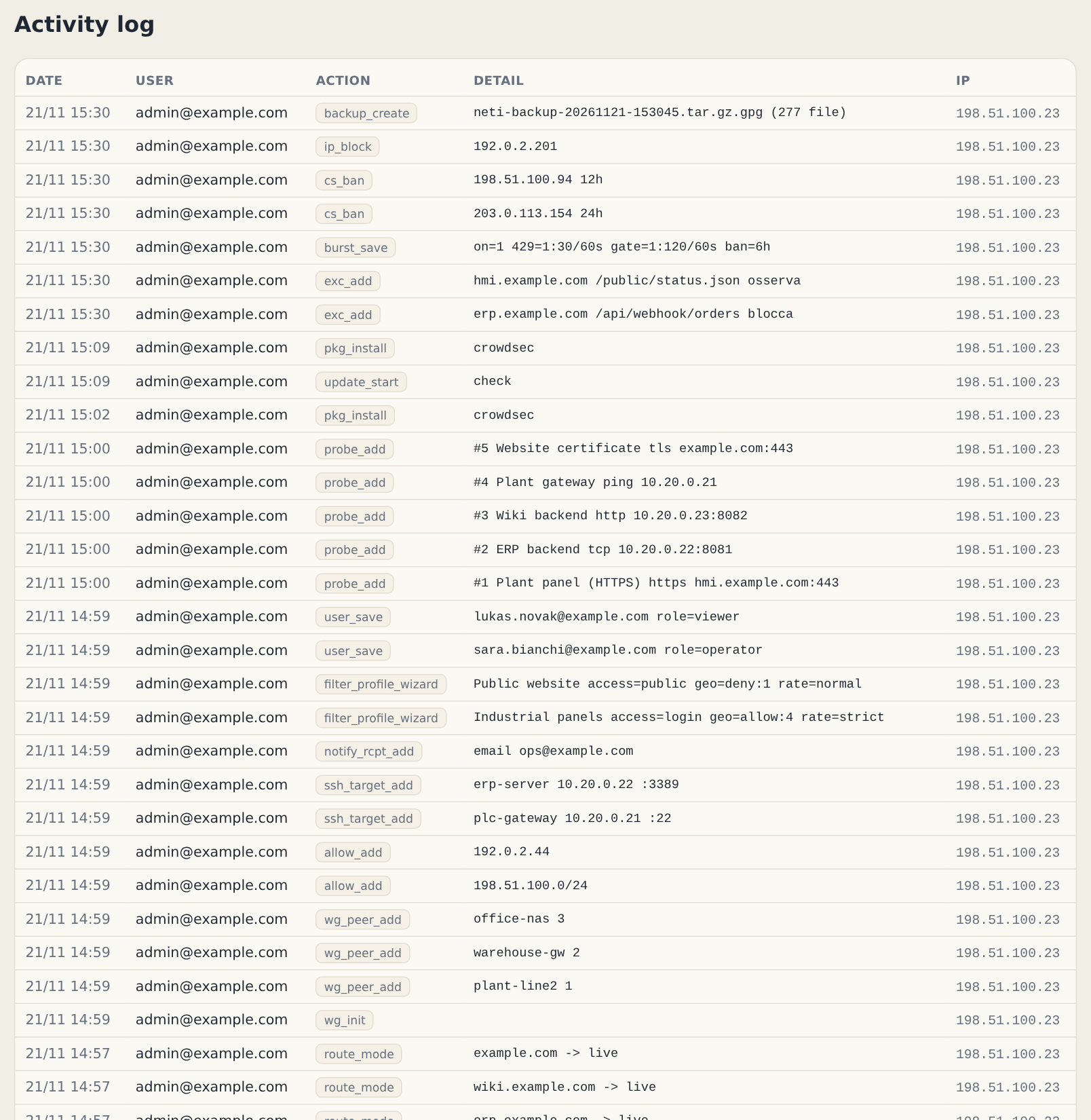
Activity log
The first table lists the last 120 operations done from the console, the most recent first. An operation is recorded when it is carried out: saving a setting, publishing or changing a service, creating or deleting a user, resetting a password, banning or unbanning an address, opening a remote access, creating a backup, starting an update, and so on. Reading a page is not an operation and is not listed here (it is a gate event, see below).
- Date
- Day, month and time of the operation, in the time zone of the server.
- User
- The email of the console user who did it.
- Action
- A short technical name of the operation, in a tag. The name tells the area and the operation, for example
set_general(general settings saved),set_email(email settings saved),set_test_email(test email sent),console_applyandconsole_confirm(console address changed, and change confirmed),user_save,user_delete,user_reset_pw,session_revoke,gate_user_add,gate_user_del,sshd_on,sshd_off,sshd_add,sshd_del(SSH access to the server),ssh_open(remote access opened),notify_set,notify_rcpt_add,notify_rcpt_del,notify_test(notifications),set_lang(a user changed their language). - Detail
- What the operation was applied to: the email of the user changed and the new role, the address added, the
domain of the service, the outcome of a test (
okorfail). Passwords, tokens and codes are never written here. - IP
- The address the console user was connected from.
When nothing has been recorded yet the table says No activity recorded.
Gate events
The second table, Gate events (sign-ins, rate limits, views), lists the last 60 events recorded by the sign-in of the console, by the gates of the services and by the automatic defenses, the most recent first. Unlike the activity log, these events are mostly produced by visitors, including unknown ones.
- Date
- Day, month and time, in the time zone of the server.
- Type
- The kind of event, in a tag. See the table below.
- The email involved, when there is one: the user who signed in, or the address typed by the visitor.
- Country
- The country of the address, with its flag, taken from the local GeoIP database. Empty for private addresses (WireGuard, local network) or when the country is unknown.
- IP
- The address of the visitor: the real one, also for services behind the Cloudflare proxy.
- Detail
- Additional data, depending on the type: the page opened, the service and the score, the reason of a refusal.
Types of event
| Type | Meaning | Detail |
|---|---|---|
login_ok | A sign-in to the console was completed. | setup when it is the creation of the first administrator. |
auth_fail_code | A wrong or expired code was typed at the sign-in of the console. | |
auth_fail_pass | A wrong password was typed at the sign-in of the console. | |
filter_allow, filter_2fa, filter_honeypot |
The outcome of the evaluation of the address at the sign-in of the console: let through with the password only (known device, good score), asked for the email code, or sent to the honeypot. See score and bands. | score= and the score obtained. |
gate_pass | A visitor passed the gate of a service with a valid code. | The service and the score. |
gate_honeypot |
A visitor of a gated service was judged hostile by the filtering and sent to the decoy page, which never lets anyone in. | The service and the score. |
gate_code_refused |
A gate did not send the code that was asked for. The gate page never tells the visitor why (so that it does not reveal which users exist): the reason is here. | The service and the reason (for example too many requests, or wait before a new code). |
ratelimit_ip | Too many codes were requested from the same address in one hour. | The address. |
ratelimit_pwreset |
A console user reached the limit of password resets (5 in 10 minutes). | |
mgmt_view | A console user opened a page of the console. | p= and the internal name of the page. |
setup_fail | Someone opened the first-access page with a wrong token. | |
ssh_open | A console user opened a temporary remote access. | Server, services, address and duration. |
crowdsec_autoban |
Neti banned an address through CrowdSec by itself: after repeated hits on the honeypot, or because of a burst of requests (automatic ban of bursts). | The address, the reason and the duration of the ban. |
burst_ban_failed |
The automatic ban of a burst could not be applied by CrowdSec. | The address and the error. |
exc_unban | An address banned by a gate exception of a service was unbanned. | The service, the address and the exception. |
When there are no events the table says No events.
Searching and filtering
The Activity page has no filters: it shows the most recent rows, enough to see what just happened. To look
further back or to search, open Logs → Activity, where the same two lists are
available as the sources Actions done from the console and Gate and access events
with all the tools of the Logs page: search by words (an email, an address, the name of an action), errors only, up
to 2000 lines shown out of the last 20,000 records, live update and download as a text file. The Logs page needs the
permission view.logs.
How long records are kept
- Activity log
- Kept without a time limit: Neti never deletes it by itself. It is the history of the changes made to the system.
- Gate events
- Kept for 180 days. Successful sign-ins to the console (
login_ok) are kept for one year, because the scoring uses them to recognize addresses that are already known. Older events are deleted automatically by the periodic maintenance of Neti.
Both lists are stored in the database of Neti, so they are included in the backups.
How to find out who changed something
- Open Activity and look at the first table: recent changes are at the top, with the user in the column User.
- If the change is older, open Logs → Activity, source Actions done from the console, and type in the search field a word that identifies it: the domain of the service, the email of the user changed, or the name of the action.
- Read the IP to know where the operation came from.
How to check who signed in and who failed
- In the table Gate events,
login_okrows are completed sign-ins to the console andgate_passrows are visitors who passed the gate of a service. auth_fail_codeandauth_fail_passrows are failed attempts on the console. A few from a colleague's address are typing mistakes; many from an unknown address or country are an attack, which fail2ban already stops after 5 failures in 10 minutes.- For a user who says "the gate does not send me the code", search the email in
Logs → Activity → Gate and access events: a
gate_code_refusedrow gives the reason.
Good to know
- Times are in the time zone of the server.
- The Activity page shows day and month without the year; the sources in Logs → Activity show the full date.
- Because every page opened by a console user is recorded as
mgmt_view, the table of gate events fills quickly while you work in the console: use the search in Logs → Activity to leave those rows out of the way, by searching for the type you are interested in. - The failed sign-ins to the console are also written, one line each, to
/var/log/neti/auth.log, the file fail2ban reads: see Logs → Console.