Honeypot
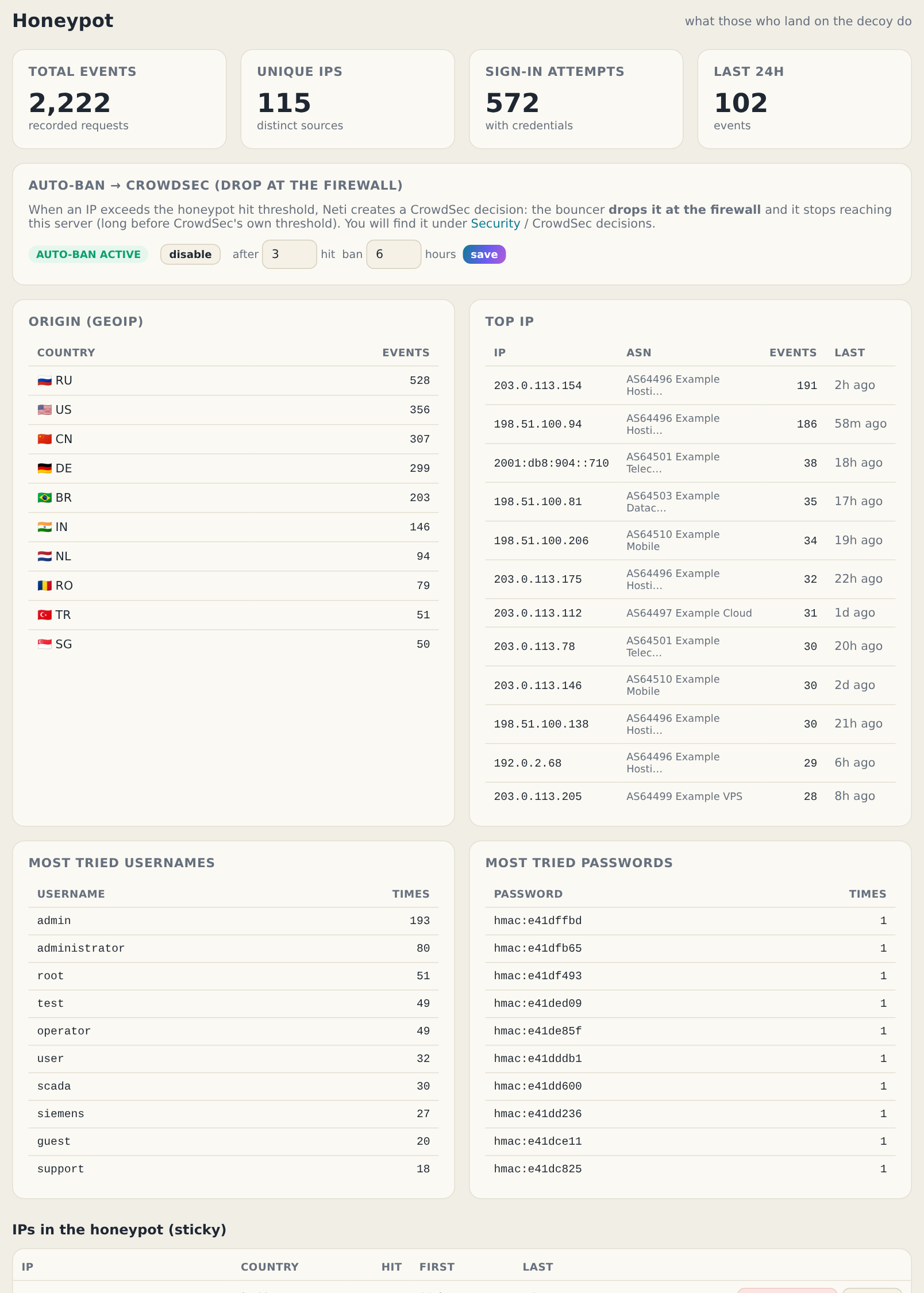
The honeypot is a trap for potential attacks. A visitor whose risk score is too low does not get the real sign-in page but a decoy: a fake login that looks ordinary, never lets anyone in and records every attempt. The address that fell into it stays marked ("sticky") and is cut off from the services until it is released. This section shows who landed on the decoy, where they came from and what they typed, and lets you ban them at the firewall through CrowdSec.
Where: menu Honeypot. Seeing the page needs the permission
view.filtering (roles Viewer, Operator and Admin); the buttons (auto-ban settings, CrowdSec
ban, release, clear log) need manage.filtering (Admin by
default, or a user who was given that permission).
The decoy page and when a visitor lands on it
When a visitor without a session opens the gate of a service, Neti computes a score from 0 to 100 with the filtering profile of that service and puts the visitor in a band: green, orange (code by email) or red. A visitor is in the red band when:
- the score is below the block threshold of the profile;
- or one of the rules that send straight to the honeypot matches, if enabled in the profile: the address is already in the honeypot, it is in a CrowdSec decision, it is a Tor exit node, or it comes from a country marked as high risk.
Addresses in the trusted networks are never put in the red band.
The red band gets the decoy instead of the gate page: a small form with a title, the fields Email and Password and a button. Whatever is typed, the page answers with an error message and shows the form again; it answers with a normal "page found" status, so that automated scanners cannot tell it from a real login. No request of the decoy ever reaches the backend, and no code is ever sent by email.
Title and error message of the decoy can be changed for each filtering profile, to make it look like the application it protects: Filtering → Profile policy → Decoy page: title (up to 60 characters) and error message (up to 120 characters). Empty fields keep the standard texts.
The login of the console has its own decoy behavior: when filtering is in enforce mode and the
score of who is signing in falls in the red band, the console answers "invalid credentials" whatever is typed and
records the attempt here, with the note console.
What is recorded
Every request that gets the decoy, both opening the page and submitting the form, does two things:
- it adds an event to the detailed log: date, IP address, country, network operator (ASN), method, the page that was asked for, the browser signature (User-Agent) and, when the form was submitted, the username and the password typed (the first 120 characters of each);
- it adds a hit to the address in the list of the IPs in the honeypot, creating the entry at the
first hit. For an IPv6 address the whole /64 network is recorded as well, as a separate row such as
2001:db8:1:2::/64, so that a new address in the same network is still caught.
The event is also written in the gate events of Activity, and the requests sent to the decoy are what the Dashboard counts as potential attacks.
The detailed log keeps the latest 5000 events; older ones are dropped automatically. Addresses in the honeypot that have not been seen for a year are removed automatically.
What happens to an address in the honeypot
Once an address is in the honeypot it stays there until someone releases it:
- on the services with the gate it is always sent to the gate page, where it sees the decoy, even if it holds a valid session;
- gate exceptions with refuse IPs caught by the honeypot on refuse it;
- the rules of Remote access can exclude it;
- with the auto-ban on, after a few hits it is dropped at the firewall and no longer reaches the server at all.
The counters
The four tiles at the top are computed from the detailed log, so they restart from zero when the log is cleared.
- Total events
- Recorded requests: every time the decoy was shown or its form submitted.
- Unique IPs
- Distinct sources among those events.
- Sign-in attempts
- Events with credentials: the form of the decoy was submitted with a password.
- Last 24h
- Events of the last 24 hours.
Auto-ban → CrowdSec (drop at the firewall)
The decoy keeps an attacker busy, but every request still costs some work. With the auto-ban, when an IP reaches the threshold of honeypot hits Neti creates a CrowdSec decision for it: the firewall component of CrowdSec drops its packets and the address stops reaching the server, long before CrowdSec's own detection would act. The ban appears in Security → CrowdSec · local decisions, from where it can be removed; see Security.
- AUTO-BAN ACTIVE / disabled
- The state. The auto-ban is active by default.
- disable / enable
- Switches the auto-ban off or on, keeping threshold and duration.
- after … hit
- The number of honeypot hits after which the IP is banned. Default 3, from 1 to 100. With 1 the first request to the decoy bans the address; a higher value lets you collect more of what the attacker tries before cutting it off.
- ban … hours
- How long the CrowdSec decision lasts. Default 6 hours, from 1 to 168 (one week). The same duration is used by the button CrowdSec ban of the table of the IPs in the honeypot.
- save
- Saves threshold and duration. They apply to the next hits; bans already made keep their duration.
Users without the permission to change see the values as text: threshold N hits · ban Nh.
How it behaves:
- The ban is made when the hits of the address reach the threshold, and made again every 25 hits after that, in case the address keeps arriving.
- It needs CrowdSec installed (Server → Components, see Server). Without CrowdSec nothing is banned; the address stays in the honeypot and keeps seeing the decoy.
- It works for the shared honeypot only. A profile with a separate honeypot never triggers the auto-ban, because a CrowdSec ban would cut the address on every service of the machine.
- An address that connects directly is dropped at the firewall. One that arrives through a proxy such as Cloudflare cannot be stopped at the firewall of the server: it keeps getting the decoy on the services with the gate.
- When the ban expires the address is still in the honeypot: if it comes back it sees the decoy again.
- Each automatic ban is recorded in the gate events of Activity.
Origin (GeoIP)
The ten countries with the most events, from the detailed log.
- Country
- Flag and two-letter code of the country of the address;
??when unknown. - Events
- Number of events from that country.
Top IP
The twelve addresses with the most events: who insists the most.
- IP
- The address.
- ASN
- The network operator the address belongs to (number and name, shortened).
- Events
- Number of events from that address.
- Last
- How long ago the last one was.
Most tried usernames
The ten values typed most often in the first field of the decoy, with the number of Times. They show what attackers are after: generic names (admin, info) mean blind attempts, real names of your people mean someone has a list. Without submissions the box says No credentials yet.
Most tried passwords
The ten passwords typed most often on the decoy, with the number of Times. They are shown in clear: they are what the attacker typed on a fake page, not the passwords of real users. If you recognize a password really in use in your organization, treat it as compromised and change it.
IPs in the honeypot (sticky)
The addresses currently held by the shared honeypot (the 30 seen most recently).
- IP
- The address, or the /64 network for IPv6.
- Country
- Flag and code of the country.
- Hit
- How many times it got the decoy.
- First / Last
- How long ago it was caught the first time and seen the last time.
- CrowdSec ban
- Bans the address at the firewall right now, without waiting for the threshold, for the number of hours set in the auto-ban box. It needs CrowdSec installed. The ban is listed in Security → CrowdSec · local decisions.
- release
- Takes the address out of the honeypot: from the next request it is evaluated again like any visitor. It does not delete its events from the log and does not remove a CrowdSec ban already made (remove that in Security). For an IPv6 address release both the address and the row of its /64 network, otherwise it is still caught. If the reasons for the low score are still there, the address falls back into the honeypot at the next visit: for an address of yours, add it to the trusted networks.
When the list is empty the table says No IPs in the honeypot.
Separate honeypots (per profile)
This table appears only when some address is held by the separate honeypot of a filtering profile. It has the columns IP, Profile (the profile that holds it), Hit, First, Last and the button release, which frees the address from that profile only.
Shared or separate honeypot
Each filtering profile chooses its honeypot in Filtering → Profile policy → Honeypot:
- shared (as it is now)
- The default. One list for the whole Neti: an address caught on one service is cut off on all the services whose profile uses the shared honeypot, and counts for the auto-ban.
- separate for this profile
- The profile keeps its own list: an address caught on its services is cut off only there, is not cut off on the other profiles, and never triggers the CrowdSec auto-ban. Useful when a service has much stricter rules than the others (for example it accepts one country only) and falling into its honeypot should not penalize the visitor elsewhere.
The page of each profile in Filtering also shows a box Honeypot (sticky IPs) with the addresses held by the honeypot that profile uses, and the same release button.
Detailed log (latest events)
The last 80 events, newest first.
- Date
- Day and time of the request.
- IP
- The address.
- Country
- Flag and code of the country.
- Method
GETwhen the decoy was only opened,POSTwhen the form was submitted. Next to it, a note says where it happened:gate:followed by the domain of the service, orconsolefor the login of the console.- Action / path
- The page of the service the visitor was trying to reach, or
login (console). - Credentials
- Username and password typed, in red; for the console only the name typed. Empty when the page was only opened.
- User-Agent
- The browser signature declared by the client; automated tools often leave their own name here.
When nothing has been recorded yet the table says No honeypot events recorded. Whoever falls in the red/honeypot band will appear here.
clear log
The button clear log, at the right of the title, appears when there is at least one event. After the confirmation Clear the honeypot log? it deletes all the events: the counters go back to zero and the tables of origin, top IP, usernames and passwords become empty. The addresses in the honeypot are not released: the sticky lists and the CrowdSec bans stay as they are. The action is recorded in Activity and cannot be undone.
How to: free a person who ended up in the honeypot
- Ask the person for their public address, or find it in the detailed log by time and service.
- In IPs in the honeypot (sticky) (or in Separate honeypots) press release on that address; for IPv6, also on its /64 row.
- If the address was banned, open Security → CrowdSec · local decisions and remove the ban.
- Find out why the score was low: in Filtering the IP simulator shows the score of an address and the rules that matched (a VPN, a datacenter network, a country outside the allowed ones). Adjust the profile, or add the address to the trusted networks if it is one of yours.
Troubleshooting
- A legitimate user sees a login that always says the credentials are wrong
- It is the decoy: the address is in the honeypot or its score is in the red band. Follow the steps above. Remember that the real gate asks for username and email, then a code: a page asking for a password before the application is not the gate.
- The auto-ban is active but nobody is banned
- CrowdSec is not installed or not running (check Server → Components), the address belongs to a profile with a separate honeypot, or the hits have not reached the threshold yet.
- A released address is back in the list
- Its score is still in the red band, or only one of the two IPv6 rows was released.
- A banned address keeps appearing in the log
- It reaches Neti through a proxy such as Cloudflare, where the firewall of the server cannot stop it. It only sees the decoy.
Good to know
- The credentials shown are data typed on a fake page. Still, a real user who fell into the decoy by mistake may have typed a real password: it is visible here to whoever can see this page. After freeing the user, have them change that password and clear the log if needed.
- Trusted networks never land on the decoy.
- The honeypot of the services works whenever the gate is on. The console login uses it only when filtering is in enforce mode.