Trusted networks
A trusted network is an IP address or a subnet that Neti treats as known and safe: typically the public address of the office, of a branch or of the administrator. Visitors from a trusted network skip the gate of the services, are never sent to the honeypot and are never banned by Neti's own rules. The same list can also be used to close the management console to everyone else. Add only addresses you control: whoever connects from a trusted network reaches the published applications without the login of the gate.
Where: menu Trusted networks (the page is titled Trusted networks
(allowlist)). Seeing it needs the permission view.filtering (roles Viewer, Operator and Admin);
adding, removing and switching the console restriction need manage.filtering (Admin by default, or a user
who was given that permission).
Management console (port …)
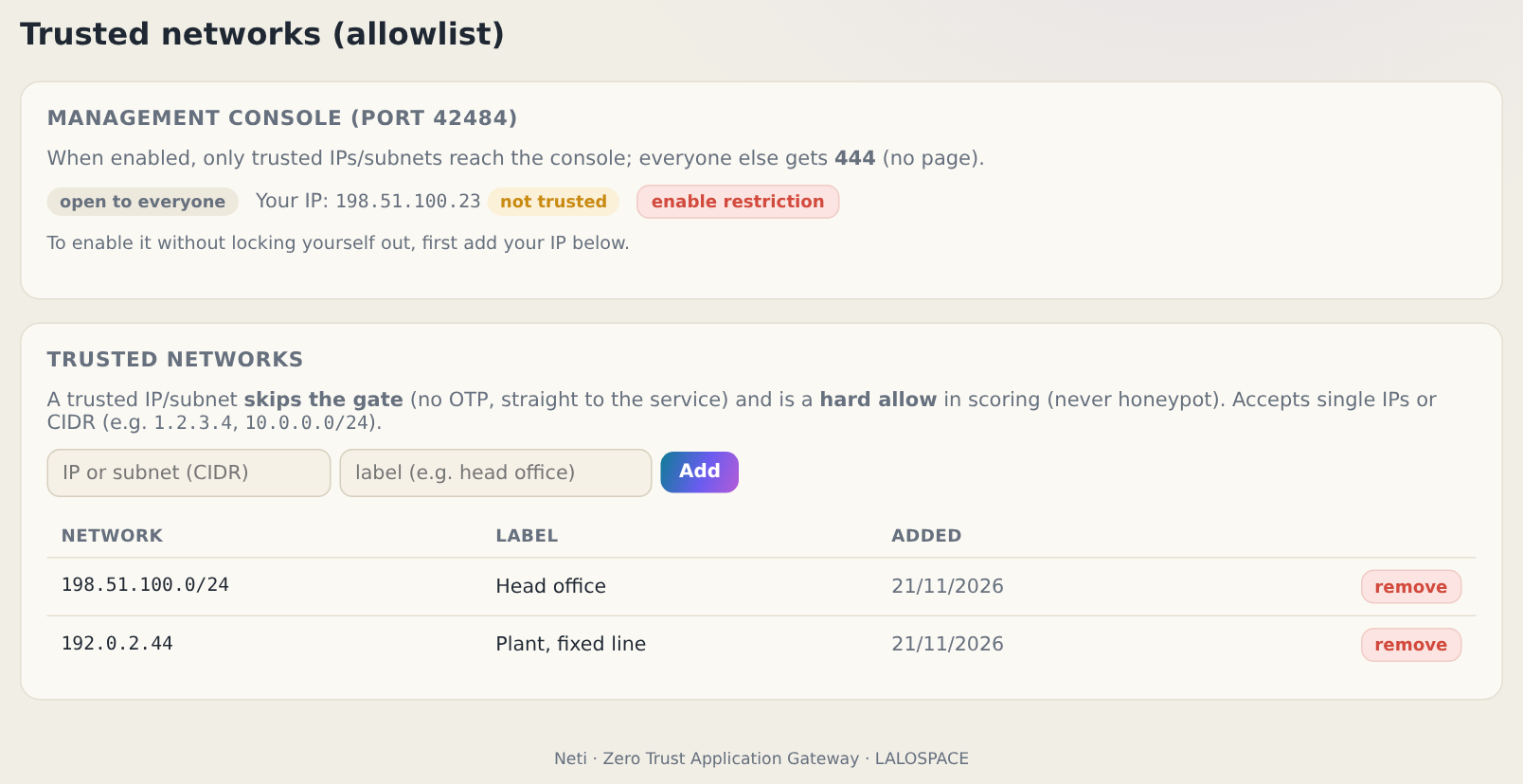
The first box, Management console (port N), where N is the port of your console, decides whether the console answers only to trusted networks. When the restriction is enabled, only trusted IPs and subnets reach the console; every other address gets no page at all (the connection is closed without an answer, code 444), as if nothing were listening there.
- RESTRICTION ACTIVE / open to everyone
- The current state. open to everyone is the state after installation: anyone who knows port and path of the console sees its sign-in page (and still needs password and code).
- Your IP
- The address you are connected from, with the pill trusted or not trusted according to the list below.
- enable restriction
- Closes the console to every address outside the trusted networks. Neti refuses to enable it if your current IP is not in a trusted network, because you would lock yourself out: it answers Not enabled for safety and asks you to add your IP first. While your IP is not trusted, the box reminds you: To enable it without locking yourself out, first add your IP below.
- disable restriction
- Reopens the console to every address.
The restriction uses the global list of this page (and the fixed entries from the configuration file), not the additional networks of the filtering profiles. It is checked by the console itself at every request. With the restriction active, Neti also refuses to change port, path or listening address of the console in Settings → General from an IP that is not trusted.
The restriction of this box and the firewall are two separate things: in Firewall you can, in addition, open the console port and the SSH port to trusted networks only, so that the other addresses do not even find the port open.
Trusted networks
The second box holds the list. It applies to the whole Neti: every service, every filtering profile, the console.
- IP or subnet (CIDR)
- A single address or a subnet in CIDR notation, IPv4 or IPv6: for example
203.0.113.10,203.0.113.0/24,2001:db8:1::/48. The prefix length goes from 0 to 32 for IPv4 and from 0 to 128 for IPv6. Anything else is refused with Invalid IP/subnet. Keep the networks as narrow as possible: a wide subnet trusts everyone inside it. - label (e.g. head office)
- An optional note, up to 80 characters, to remember whose address it is.
- Add
- Adds the network. Neti rewrites the configuration of the published services at once, so the new network is effective immediately on the gate, the country filter and the limits described below.
The table lists the networks:
- Network
- The address or subnet.
- Label
- The note written when adding.
- Added
- The date it was added.
- remove
- Removes the network at once and rewrites the configuration of the services. If the console restriction is active and it was the network you are connected from, your next request to the console is refused: check Your IP before removing.
- from configuration (secrets) · fixed
- Rows with this label come from the configuration file of the installation, not from the console: they behave like the others but cannot be removed here.
Additions and removals are recorded in Activity.
What a trusted network does
Being trusted has the same meaning everywhere in Neti: the address is not a stranger, so the controls meant for strangers do not apply to it.
- Gate of the services
- A request from a trusted network passes straight to the application: no sign-in page, no code by email, no session needed. This is checked before anything else, so it holds even if the same address had ended up in the honeypot or had been banned on the service. See Gate.
- Score and honeypot
- In the filtering score a trusted address is a "hard allow": the rule for trusted addresses wins over every other signal, so the address is never put in the red band and never sees the decoy page of the honeypot. The rule is on in every profile unless someone disabled it there.
- Country filter
- If a filtering profile limits a service to some countries, trusted networks always pass: who administers is not locked out when traveling.
- Gate exceptions
- On an address left open by a gate exception, trusted networks have no request limit, are not checked for honeypot or Tor, and are never banned on the service. The checks on method, content type, origin and size still apply to them.
- Automatic ban of bursts
- The automatic ban of bursts in Security never bans a trusted network. For this ban, the global networks and the additional networks of every filtering profile all count.
- Remote access
- The rules of remote access (Settings → Remote access, see Remote access) have a choice Trusted networks: Always allowed (from trusted networks country and score do not matter; the blocks still apply), Only from trusted networks (no access can be opened from any other address; it needs at least one trusted network) or Like everyone else. Here only the global list counts.
- Firewall
- In Firewall, the SSH port and the console port can be opened to trusted networks only. The firewall uses the IPv4 entries of the global list (single addresses and subnets from /8 to /31); IPv6 entries are not used there.
- Management console
- With the restriction of the first box, only trusted networks reach the console.
What a trusted network does not do: it does not skip the login of the console (password and code are still required there), it does not skip the login of the application behind the gate, and it is not exempt from the general request limit of a filtering profile. CrowdSec is an independent component that works on the firewall of the whole machine with its own lists.
Global and per-profile trusted networks
There are two levels:
- Global: the list of this page. It applies to every service and to the console.
- Per profile: each filtering profile can add its own networks in Filtering → Profile policy → Additional trusted networks (one per line). They are added to the global ones and apply only to the services that use that profile: gate, score, country filter and exceptions of those services. The same formats are accepted (single IP or CIDR, IPv4 or IPv6); an invalid entry stops the save and is named in the message.
Use the per-profile networks when an address must be trusted for one application only, for example the office of a customer who uses a single service. Use the global list for your own offices. See Filtering.
How to: close the console to everyone but the office
- Open Trusted networks and read Your IP in the first box.
- In the second box add that address (or the subnet of the office) with a label, and press Add. The pill next to your IP becomes trusted.
- Add every other place you may need to administer from. An address that changes often (a home line, a phone) is not a good candidate: the day it changes, the console no longer answers from there.
- Press enable restriction. The pill becomes RESTRICTION ACTIVE.
Troubleshooting
- "Not enabled for safety: your current IP … is not in any trusted network"
- You pressed enable restriction from an address that is not in the list. Add it first, then enable.
- A colleague in the office is still asked for the code at the gate
- Their public address is not the one in the list: ask them to check the address they go out with (an office with two lines has two), or look at it in the gate events of Activity. Behind the Cloudflare proxy Neti reads the real address of the visitor, so the address to add is always the one of the office.
- The console does not answer any more after the public IP of the office changed
- With the restriction active, the console answers only to the listed networks. Reach it from another trusted network, then update the list.
- The firewall choice "trusted networks only" ignores an entry
- The firewall uses only IPv4 entries, single addresses or subnets from /8 to /31.
Good to know
- A trusted network is a strong statement: anyone on that network reaches the applications behind the gate without the gate's login. Do not add shared or public networks.
- Adding your own address is the simplest way not to be slowed down or banned while you test a service.
- For IPv6 write the subnet you really own (often a /64 or a /48), not a single address that may change.