License
Neti has two editions. Free costs nothing, never expires and needs no activation. Pro is a yearly subscription per node (a node is a server on which Neti is installed): it removes the limits of Free, lets you put your own brand on the pages your visitors see, and adds scheduled updates, automatic remote backups, the Pro update channel and the vendor's support. The License page shows which edition this server is running, the limits and how much of them is used, and is where a node is activated, renewed or deactivated.
Where: Settings → License. Only users with the Admin role see the page and can use it. Under the title the page states the edition: Free edition or Pro edition.
What Pro adds and how to use it is explained in Neti Pro. This page explains the limits of Free and how the license works: activation, renewals, expiry, moving a license, data sent.
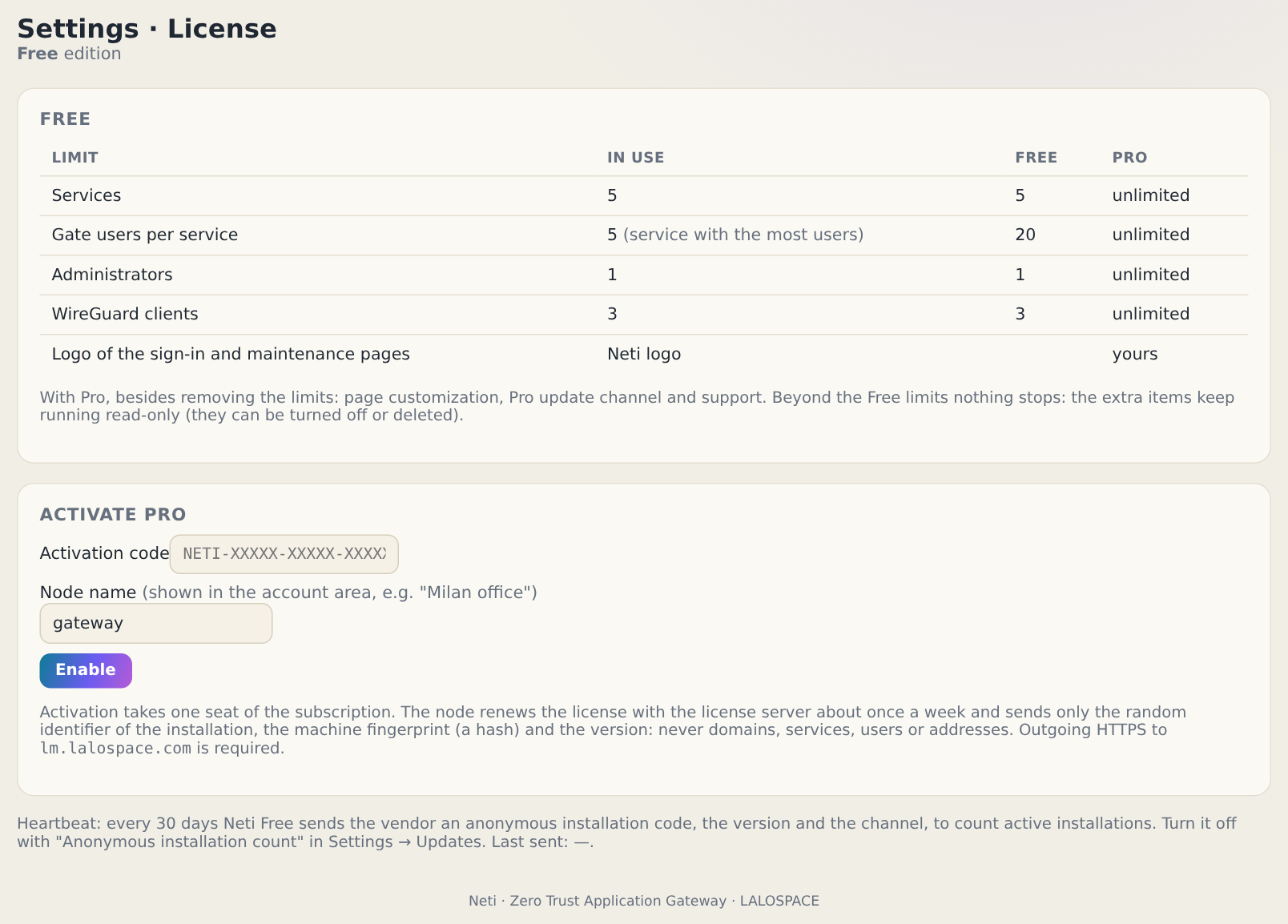
Limits of the Free edition
On a Free node the box Free shows a table with one row per limit and four columns: Limit, In use (how many this node has now), Free (the limit of this node) and Pro (unlimited).
- Services — 5
- Published services, whether switched on or off.
- Gate users per service — 20
- Users allowed through the gate of each single service. The In use column shows the service with the most users ((service with the most users)).
- Administrators — 1
- Console users with the Admin role. Viewer and Operator users are not limited in number, but in Free they cannot receive the management permissions reserved for the Admin: managing users, settings, system components, backups and updates. Trying to give one of them answers Free edition: the permissions … are reserved for the Admin role. With Pro they can be given to other users too. With Pro, a user who receives the permission to manage users without being Admin cannot touch the Admin users or assign that role, and can give only the permissions he or she holds (see Users).
- WireGuard clients — 3
- Clients of the WireGuard network of Neti, including the backend servers connected through the tunnel.
- Logo of the sign-in and maintenance pages — Neti logo
- In Free the gate page and the standard maintenance page show the Neti logo; with Pro, yours (see Branding).
When a limit is reached, adding one more item is refused with Free edition: at most … Pro has no limits (Settings → License). The limits apply to additions: nothing that is already configured stops working.
Installations that already had more
When the editions were introduced, Neti recorded once how many services, administrators, WireGuard clients and gate users each existing installation had. Those items stay fully editable: the limit of that node is the higher of the Free limit and that number. In the table such a limit is marked (already there). The recorded number never grows.
Items beyond the limits: read-only
When a node goes back from Pro to Free (subscription expired, seat freed, node deactivated) it may have more items than Free allows. Nothing stops: the items beyond the limit, which are the most recently created ones, keep working in read-only mode.
- They can be turned off, put in maintenance or deleted, but not edited: an attempt answers Free edition: this item is over the limits and keeps working, read-only. You can switch it off or delete it; editing it requires Pro (Settings → License).
- The renewal of their certificates continues.
- A notice at the top of every console page says how many there are: Free edition: … Items over the limit keep working, read-only.
Activating or renewing Pro makes everything editable again.
Activate Pro
On a node that has never been activated, the box Activate Pro turns the node into a Pro node.
- Activation code
- The code you receive after the purchase, in the form
NETI-XXXXX-XXXXX-XXXXX-XXXXX-XXXXX. Capital or small letters do not matter, and neither do the hyphens. One code is valid for all the seats (nodes) of the subscription. A code that is too short is recognized at once (invalid activation code). - Node name
- A name of up to 60 characters that identifies this server in the account area, for example "Main office" or "Customer gateway". The field is pre-filled with the host name of the server. Required.
- Enable
- Sends the activation to the license server. If it succeeds the node takes one seat of the subscription and becomes Pro (Node activated: Pro active.); the Pro package is then installed by itself (see The Pro package).
If all the seats of the subscription are taken, the page lists the nodes that use them, with the columns Node and Last contact: free a seat in the account area and try again.
Under the form a note reminds what activation implies: it takes one seat; the node renews the license about once a week; it sends only the random identifier of the installation, a fingerprint of the machine (a hash) and the version; and outgoing HTTPS to the license server is required (the note shows its host name). There is no activation without an Internet connection.
Pro: status of the license
On an active Pro node the box Pro with the label active replaces the Free box.
- Node name
- The name given at activation.
- Subscription valid until
- When the subscription ends, unless it is renewed.
- Last renewal with the license server
- The last time the node was successfully recognized by the license server.
- Next renewal
- When the node will contact the license server again by itself.
- Attestation valid until
- Until when the node stays Pro even if it can no longer reach the license server. Every successful renewal moves this date forward.
- Pro package
neti-prowith its version when it is installed; being installed from the Pro channel while the node is still downloading it.- Last error
- Shown only when the last contact with the license server failed, with the reason (for example the license server could not be reached).
- ⟳ Renew now
- Contacts the license server immediately instead of waiting for the next automatic renewal. Use it after the subscription has been renewed or changed, after a network problem, or when the Pro package has not arrived: it also starts its installation again.
- Deactivate this node
- After a confirmation, frees the seat at once and brings the node back to Free: everything keeps running, items beyond the Free limits become read-only. Use it before moving the license to another server. If the license server cannot be reached the node stays active (Deactivation failed…): free the seat from the account area instead.
- Account area ↗
- Opens, in a new tab, the account area on the product website (see The account area).
A node that was activated and is now Free
If the node was activated but is not Pro at the moment, the Free box starts with This node was activated but is now Free: followed by the reason, and a notice with the same reason appears at the top of every console page.
- subscription expired
- The subscription ended and the grace period is over. When the subscription is renewed the node goes back to Pro by itself within a week, or right away with Renew now.
- lease expired (renewal failed)
- The node has not reached the license server for too long. Restore outgoing HTTPS and press Renew now.
- lease issued for another machine
- The license on this server was issued for a different machine: typically a copy of a virtual machine or a restore on new hardware. See Copies and restores.
- invalid lease
- The license file is damaged or not signed by the vendor. Press Renew now; if it does not help, free the seat and activate again.
- ⟳ Renew now
- Asks the license server again.
- Free the seat
- After a confirmation, gives the seat back to the subscription and removes the activation from this node, which stays Free. The Activate Pro box then appears again.
Notices about the license
The License page, and for the most important ones the top of every console page, can show these notices:
- Notice from the vendor: …
- A message sent by the license server with the last renewal.
- License: … Choose in the account area which node keeps the license.
- The license server saw the same license on two machines, see Copies and restores.
- Pro license: renewal with the license server has been failing for more than 30 days; it expires on …
- The node is still Pro but cannot reach the license server. Check outgoing HTTPS before the date shown.
- Pro license: the subscription expires on …
- Shown during the last 30 days of the subscription; after the expiry date it adds (already expired: grace period running).
- License: this node is back to Free (…)
- With the reason, as in A node that was activated and is now Free.
Renewal, expiry and unreachable license server
- Automatic renewal of the license. About once a week the node contacts the license server and receives a new signed attestation. Nothing has to be done. Nodes spread their calls over a few hours, so the time of the next renewal differs from node to node.
- If the license server cannot be reached the node tries again every 6 hours and stays Pro for 44 days from the last successful renewal; after 30 days the console shows a notice. Even after that, no service stops: the node becomes Free and the Free limits apply to changes. Renew now forces a contact at any time.
- Expiry of the subscription. The console warns during the last month, and the email address of the account receives a notice 30 and 7 days before and on the day of expiry. After the expiry there are 14 days of grace; then the node goes back to Free with the rules described in Items beyond the limits, and the Neti logo comes back on the pages for visitors. When the subscription is renewed the node goes back to Pro by itself within a week, or right away with Renew now.
- Server clock. The node checks dates against the time signed by the license server at the last contact: moving the clock of the server back does not extend a license.
Moving the license to another server
- On the old server press Deactivate this node: the seat is free at once. If the old server no longer exists or cannot be reached, free its seat from the account area instead.
- On the new server open Settings → License and activate it with the same code.
At most 3 transfers per month are allowed for each subscription. See also Several nodes and moving to another server.
Copies and restores
A license is valid for one machine only. If a copy of the same node (a cloned virtual machine, a restore from a backup while the original is still running) shows up at the license server while the original is still active, the server notices it, the console shows a notice and an email is sent to the account. Choose in the account area which node keeps the license; without a choice, after 14 days the original machine keeps it. The other machine goes back to Free at its next contact.
A restore made after the original node has been silent for more than 8 days is accepted by itself.
What is sent
- Pro, at activation and at every renewal: the activation code (at activation only), the node name you chose, the random identifier of the installation, a fingerprint of the machine (a hash, not readable data) and the version of Neti.
- Free, once every 30 days (the heartbeat): the random identifier of the installation, the version and the channel, to count the active installations. The License page shows when it was last sent (Last sent: …). It is turned off with Anonymous installation count in Settings → Updates, together with the count made by the update check (see Anonymous installation count).
- Never domains, services, users, addresses of the backends or configuration.
The answers of the license server are digitally signed: a node does not accept licenses or commands that are not signed by the vendor.
Troubleshooting
- Activation answers that the license server is not reachable
- The server must be able to open HTTPS connections to the license server named in the note of the Activate Pro box. Check the outgoing firewall rules and the DNS of the server, then try again: repeating the activation with the same code is safe.
- invalid activation code
- The code is incomplete or mistyped. Paste it as received.
- this node is already activated: deactivate it first
- The node already holds an activation. Use Renew now, or Deactivate this node / Free the seat before activating with another code.
- All the seats are taken
- The page lists the nodes that use them. Free one from the account area, or add seats to the subscription.
- The node is Pro but Pro package still says being installed from the Pro channel
- See The Pro package.
- Last error shows that the license server could not be reached
- The node keeps trying every 6 hours and stays Pro until the date in Attestation valid until. Restore outgoing HTTPS and press Renew now.
Good to know
- The license never stops production: with an expired license, an unreachable license server or a freed seat, published services, tunnels, certificates and protections keep working. Only additions and edits beyond the Free limits are refused.
- Settings made with Pro (branding, scheduled updates, remote backup destination) are kept while the node is Free and come back when it is Pro again.
- The license of a node is in
/etc/neti/license.json(a signed document without secrets). It is bound to the machine: copying the file to another server does not make it Pro. - Activation, renewal and deactivation from the console are recorded in Activity.