Security
The Security section is the defense center of the server: it shows who is connected right now and which addresses are being stopped, by whom and why. From here you turn on the automatic ban of the addresses that fire bursts of requests, you unblock an address that was banned by mistake, and you block an address by hand.
Where: menu Security (the page is titled Security &
connections). To see it you need the permission to view connections (view.connections: roles
viewer, operator and admin by default). The actions need more:
- changing the Automatic ban of bursts and unblocking a CrowdSec decision: permission to
configure filtering (
manage.filtering, role admin by default); - unblocking an address in fail2ban:
action.fail2ban.unban(operator and admin); - blocking and unblocking an address by hand:
action.connections.block(operator and admin).
Without a permission the corresponding buttons are not shown.
Three tools work together here, and it helps to know who does what:
- fail2ban reads log files and counts: so many failures from one address in so many minutes. Each counter is called a jail.
- CrowdSec keeps a list of addresses to stop (decisions), fed by the community blocklist, by its own detection and by Neti; its firewall component drops those addresses before they reach any service.
- The manual block list of Neti: addresses that you decided to drop at the firewall.
fail2ban and CrowdSec are optional components: they are installed from Server → Components (see Server).
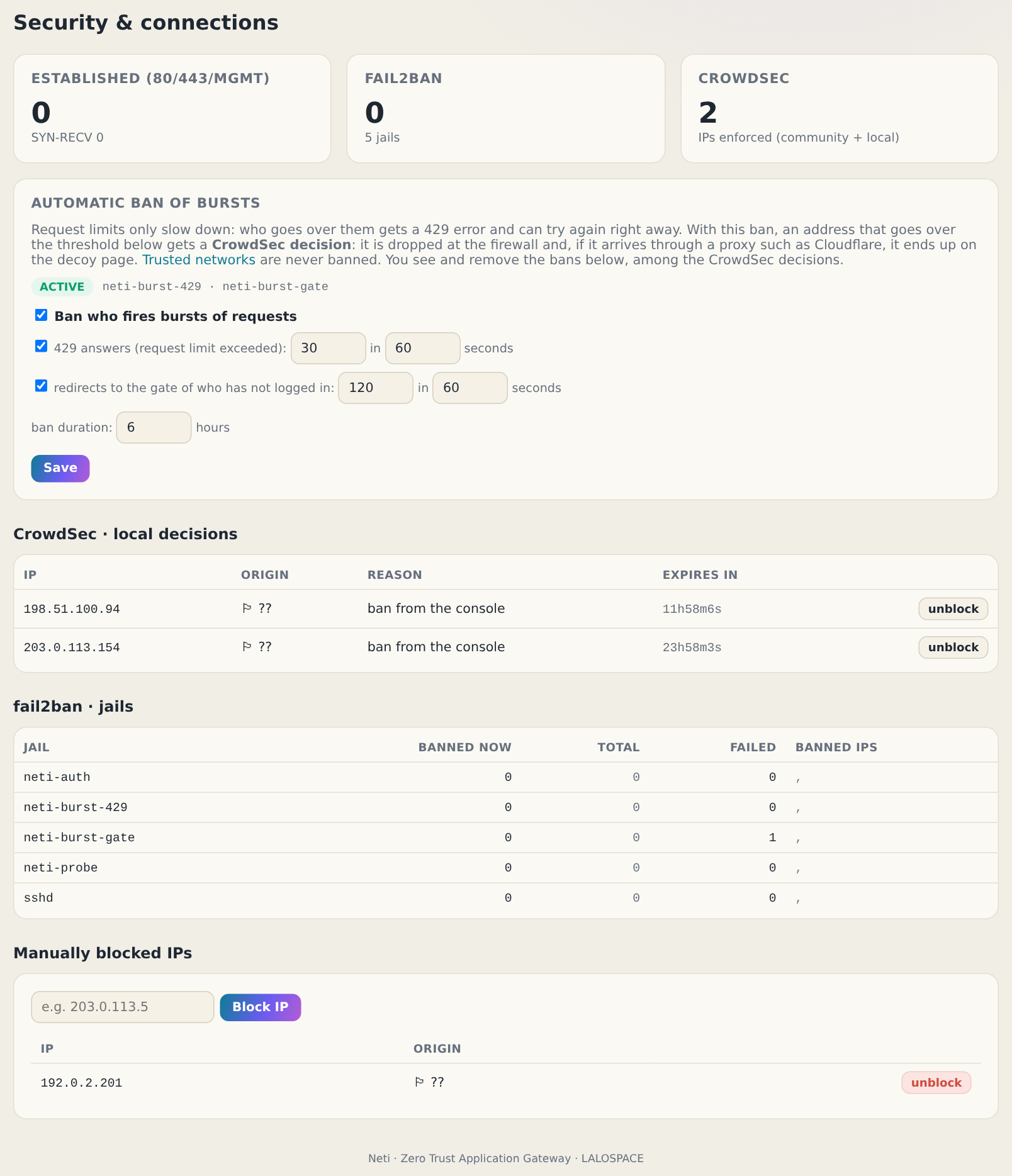
The three tiles
Established (80/443/mgmt)
The number of TCP connections open at this moment towards the web ports of the proxy (80 and 443) and the port of the console. The line below, SYN-RECV, counts the connections that are still half-open (the first packet arrived, the handshake is not complete).
How to read it: the number follows the traffic of your services and has no "right" value. A SYN-RECV count that stays high while the established connections do not grow means that many connection attempts are not being completed, which is typical of a flood of connection requests. The tile counts at most 300 established connections.
fail2ban
The number of addresses banned right now, summed over all the jails, and below it how many jails are running (N jails). If fail2ban is not installed the tile shows not installed. The detail per jail is in the table fail2ban · jails.
CrowdSec
The number of addresses that the firewall is dropping on behalf of CrowdSec at this moment: IPs enforced (community + local), that is the community blocklist plus the local decisions. It is normally a large number (thousands), almost all from the community list. If CrowdSec is not installed the tile shows not installed. The local decisions are listed in the table CrowdSec · local decisions.
Automatic ban of bursts
The request limits of Neti (the one of the sign-in page of the gate and the
request limit of the filtering profile) only slow down: who goes over them
gets a 429 error and at the next request is served again. A scanner that tries hundreds of addresses in a few seconds
(.env files, keys, configuration files) is therefore free to go on. The automatic ban gets it out of the
way: an address that goes over the threshold receives a CrowdSec decision and is dropped at the
firewall.
It is off until you turn it on, also after an update.
Status pills
- ACTIVE
- The ban is on and its fail2ban jails are running. Their names are shown next to the pill:
neti-burst-429,neti-burst-gate, or only the one you chose to count. - on but not running
- The ban is turned on but no jail is running. This happens when there is no published service yet (there is nothing to count: the jails start by themselves when the first service is published), or when fail2ban is stopped or missing.
- off
- The ban is turned off: request limits only answer 429.
- fail2ban not installed: it is needed to count
- Warning: install fail2ban from Server → Components.
- CrowdSec not installed: it is needed to apply the ban
- Warning: install CrowdSec from Server → Components.
Both components are needed: fail2ban counts, CrowdSec applies. If one is missing the ban cannot be turned on and the save answers Burst ban not applied: … with the reason.
Settings
- Ban who fires bursts of requests
- The main switch. Default: off. With the switch on, at least one of the two counters below must be ticked, otherwise the save answers Choose at least one thing to count.
- 429 answers (request limit exceeded): … in … seconds
- Counts the 429 answers given to one address, on all the published services. A 429 answer comes when an address goes over the limit of the gate pages (30 per minute) or over the request limit of the filtering profile of the service. Default: counted, 30 answers in 60 seconds. Allowed values: 5 to 10000 answers, 10 to 3600 seconds. A person hardly ever gets a 429; but if a filtering profile has the strict limit and the site loads many resources together, raise the threshold, or legitimate visitors will be banned.
- redirects to the gate of who has not logged in: … in … seconds
- Counts the requests without sign-in to the services with the gate, which Neti redirects to the sign-in page. It is useful against a scanner that does not follow the redirect and therefore never meets the limit of the sign-in page. Default: not counted, 120 redirects in 60 seconds. Allowed values: 10 to 10000 redirects, 10 to 3600 seconds. Keep the threshold high: a page left open in a browser with an expired session produces a few redirects per minute by itself.
- ban duration: … hours
- How long the address stays banned. From 1 to 168 hours (one week); default 6.
- Save
- Saves the settings and applies them at once: Neti rewrites the fail2ban configuration of the two jails, checks it and reloads fail2ban. If the check fails, the previous settings come back and the message says why. Confirmation: Automatic ban of bursts on. or Automatic ban of bursts off.
Without the permission to change, the box shows the current values on one line, for example 429: 30 in 60 s (counted) · redirects to the gate: 120 in 60 s (not counted) · ban 6 h.
How the ban works
- The counting is done by fail2ban on the access logs of the services
(
/var/log/nginx/sites/*.access.log); the ban is a CrowdSec decision written by Neti. The fail2ban files of this feature (/etc/fail2ban/jail.d/neti-burst.local) are managed by Neti: do not edit them by hand, they are rewritten at every save. - An address that arrives directly is dropped at the firewall, on every port.
- An address that arrives through a proxy such as Cloudflare cannot be stopped at the firewall,
because the connection comes from the proxy. On the services with the gate it ends up on the decoy page, because
the filtering score sends the addresses listed by CrowdSec to the honeypot (rule
crowdsec_hit). On services without the gate behind a proxy the ban has no effect. - The trusted networks are never banned: the global ones (Trusted networks) and the additional ones of every filtering profile.
- An address that already has a CrowdSec decision is left as it is: the ban is not extended.
- The bans appear in the table CrowdSec · local decisions, with the reason (burst: 429 answers or burst: redirects to the gate) and the time left; from there you remove them with unblock. Each ban is also a gate event and is counted in the Protection box of the Dashboard.
- The table fail2ban · jails shows the two jails,
neti-burst-429andneti-burst-gate, with the addresses that went over the threshold in the last ten minutes. - When you publish a new service, its log is added to the jails automatically.
Choosing the thresholds
- Start with the defaults (429 answers only) and look, after a few days, at who was banned: the table of the local decisions shows the country and the reason.
- If real visitors are banned, the request limit of their filtering profile is probably too strict for the site: relax the limit first (see Request limit per IP), then raise the threshold here.
- Turn on the count of the redirects to the gate only if you see scanners insisting on services behind the gate, and keep the number well above what an open browser tab can produce.
- Put the networks of your offices in the trusted networks: they are never banned, whatever they do.
CrowdSec · local decisions
The table lists the decisions taken on this server (up to 200): the bans written by Neti and those of CrowdSec's own detection scenarios. The addresses of the community blocklist are not listed one by one: they are only counted in the CrowdSec tile. The table is shown only when CrowdSec is installed; when there is nothing it says No active local decision.
- IP
- The banned address.
- Origin
- Country of the address (
??when unknown). - Reason
- Why the address was banned:
- burst: 429 answers: the automatic ban of bursts, counter of the 429 answers;
- burst: redirects to the gate: the automatic ban of bursts, counter of the redirects;
- honeypot auto-ban: the address reached the decoy page several times (settings in Honeypot);
- ban from the console: somebody banned it by hand with the button ban CrowdSec of the Honeypot page;
- any other text is the name of the CrowdSec scenario that detected the address, followed in parentheses by the origin of the decision.
- Expires in
- Time left before the decision ends by itself.
- unblock
- Removes every CrowdSec decision on that address: the firewall stops dropping it within moments. The address is also forgotten by the two burst jails, so that a new burst can be banned again. Confirmation: IP … removed from the CrowdSec decisions. If the address had also ended in the honeypot, release it there too, otherwise it keeps landing on the decoy page (see Honeypot (sticky IPs)).
After an unblock, the sign-in pages may still treat the address as banned for up to a minute, because the answer of CrowdSec is remembered for 60 seconds.
fail2ban · jails
One row per jail running on the server. If fail2ban is missing the table says fail2ban not installed or no jails.
- Jail
- Name of the jail.
- Banned now
- Addresses banned by this jail at this moment.
- Total
- Bans issued by the jail since fail2ban was last started.
- Failed
- Failures currently being counted: attempts by addresses that have not reached the threshold yet.
- Banned IPs
- The addresses banned now, each with the button unblock. The button removes the address from all the jails, not only from the one of the row. Confirmation: Unblocked …
The jails you find on a Neti server:
neti-auth
Counts: failed sign-ins to the console: wrong email code, wrong password, wrong setup code. Threshold: 5 failures in 10 minutes. Ban: 1 hour, on the port of the console. A few human mistakes are tolerated; a program that guesses is stopped after five attempts.
neti-probe
Counts: probing on the port of the console: requests for pages and files that do not exist there (which the console closes without answering) and malformed requests. Requests to the real address of the console are not counted. Threshold: 2 hits in 10 minutes. Ban: 24 hours, on the port of the console. Probing is clearly hostile, so the threshold is low and the ban long.
neti-exc-N
One jail for each gate exception that has its own ban turned on (N is the number of the exception). Counts: the requests refused on the paths of that exception and, if chosen, the errors answered by the backend. Threshold and ban: those set in the exception; by default 5 hits in 10 minutes, ban of 24 hours. This ban does not use the firewall: the address is refused only on that service. Trusted networks are never banned. You can remove the ban here or from the page of the service.
neti-burst-429 and neti-burst-gate
The two counters of the automatic ban of bursts, present only while the ban is on.
Threshold: the one set in the box (by default 30 answers in 60 seconds for
neti-burst-429, 120 redirects in 60 seconds for neti-burst-gate). These jails only count:
the real ban is the CrowdSec decision, which lasts the hours set in the box. For this reason an address stays in the
column Banned IPs of these two jails only for ten minutes, while its decision remains in
CrowdSec · local decisions until it expires. To free an address use
unblock in the CrowdSec table.
sshd
The standard jail of fail2ban for the SSH service of the server: it bans the addresses that fail the SSH login repeatedly. It is not written by Neti and its thresholds are those of the fail2ban package.
Manually blocked IPs
The addresses dropped at the firewall because somebody decided so. Use it for an address that is clearly hostile and that the automatic tools have not caught, or that you want to keep out for good: a manual block has no expiry.
- Address field and Block IP
- Type one address, IPv4 or IPv6 (for example
203.0.113.5), and press Block IP. Only single addresses are accepted, not networks. Confirmation: Blocked …; an address that is not valid gives an error. - IP
- The blocked address.
- Origin
- Country of the address (
??when unknown). - unblock
- Removes the block at once. Confirmation: Unblocked …
When there is none the box says No manually blocked IPs. The button Block next to the addresses of the table Suspicious connections in the Dashboard adds to this same list.
How a manual block is enforced
- The address is added to a dedicated firewall table of Neti that drops every packet coming from it, on every port of the server: published services, console and SSH included. It acts before the other firewall rules.
- The block is permanent and survives a reboot: the list is saved in
/etc/neti/block.nftand loaded again at startup. - There is no check against the trusted networks and no check on your own address: if you block the address you are connected from, you lose the console immediately. See What to do if you banned yourself.
- A visitor that reaches a service through a proxy such as Cloudflare is not stopped by a manual block of its address, because the connection arrives from the addresses of the proxy. For those services use the filtering profile, or a CrowdSec ban, which the gate honors through the score.
- The list also shows the addresses dropped by plain
iptablesrules added on the server outside Neti, if there are any. - Every block and unblock is recorded in Activity with the name of who did it.
What to do if you banned yourself
It happens: too many wrong codes, a test with a script from the office, a mistyped address in the manual block. First understand which tool stopped you, from the symptom:
| Symptom | Probable cause |
|---|---|
| The console does not answer, the published sites and SSH still do | fail2ban, jail
neti-auth or neti-probe (they block only the port of the console): it ends by itself
after 1 hour or 24 hours |
| Nothing on the server answers from your address | a CrowdSec decision (burst ban, honeypot auto-ban) or a manual block |
| One service refuses you, the rest works | the ban of a gate exception
(neti-exc-N) |
| The sign-in of a service always says that the credentials are wrong | your address is in the honeypot: see Filtering, troubleshooting |
From the console, through another connection
- Reach the console from a different public address: the mobile network of your phone used as a hotspot is usually the quickest.
- Open Security and look for your usual address in the three places: CrowdSec · local decisions, the column Banned IPs of fail2ban · jails, Manually blocked IPs.
- Press unblock where you find it.
- If the address also appears in Honeypot, release it there.
From a shell on the server
If you still have SSH (or the console of your hosting provider), as root:
cscli decisions delete --ip 203.0.113.5
fail2ban-client unban 203.0.113.5
The first command removes the CrowdSec decisions on the address, the second removes it from all the fail2ban jails. Replace the example address with yours. For a manual block, list the rules with their handles and delete the one of your address:
nft -a list chain inet neti_block input
nft delete rule inet neti_block input handle NUMBER
A rule deleted this way comes back at the next reboot, because the saved list still contains it: afterwards open the console and press unblock on the address in Manually blocked IPs, which also updates the saved list.
So that it does not happen again
Add the addresses you work from to Trusted networks. A trusted network skips
the gate of the services, is never sent to the decoy page, passes the country filter, and is never banned by the
automatic ban of bursts or by the bans of the gate exceptions. It is still subject to the jail
neti-auth: five wrong sign-ins to the console in ten minutes are banned from any address.
Troubleshooting
The burst ban shows "on but not running"
- No service is published yet: nothing to do, the jails start with the first service.
- fail2ban is stopped: check it in Server (systemd units) and start it, then press Save again in the box.
An address was banned for a burst but still reaches a site
The site is behind a proxy such as Cloudflare and has no gate: the firewall sees the proxy, not the visitor, so the decision cannot be applied there. With the gate on, the visitor ends on the decoy page. For a main zone on Cloudflare, the addresses banned by CrowdSec can also be stopped on the Cloudflare edge (blocking on the edge): see Settings → DNS in Settings.
Legitimate visitors are banned by the burst ban
Look at the reason in CrowdSec · local decisions. With burst: 429 answers the request limit of the filtering profile is too strict for the site, or the threshold here is too low: relax one of the two. With burst: redirects to the gate raise the threshold or stop counting the redirects. Then unblock the addresses, and add the networks of known offices to the trusted networks.
An unblocked address is banned again right away
The cause is still there: the program on that address keeps sending bursts, or keeps failing the sign-in. Stop it first. An address removed from the CrowdSec decisions but still in the honeypot keeps seeing the decoy page: release it in Honeypot.
The table of the CrowdSec decisions is missing
CrowdSec is not installed: the tile says not installed. Install it from Server → Components.
Good to know
- Who bans what. fail2ban bans of the console (
neti-auth,neti-probe) close only the port of the console. CrowdSec decisions and manual blocks close the whole server. The bans of the gate exceptions close one service. - Bans and the filtering score. An address banned by fail2ban loses points in the score of the
filtering profiles (rule
f2b_recent); an address with a CrowdSec decision is sent to the decoy (rulecrowdsec_hit). - Honeypot auto-ban. The addresses that insist on the decoy page are banned through CrowdSec automatically: the settings are in Honeypot, the resulting decisions are in this page.
- Other protections of the server (firewall, access to SSH, security updates) are described in How Neti protects itself and Firewall.
- Logs. The log of fail2ban and of the other components can be read in Logs.